Can't find your Fields in the Object Manager search using Lightning Experience?
Then, this is the blog post you are looking for.
What's the problem?
The problem is that, as of November 2018, the search functionality for the Object Manager in Lightning Experience only provides searches by the Label of the objects and the Label of the field.
How did I find out?
I found out about this problem a couple of weeks ago, when I was working in a project where the API Field names don't quite follow the best practices and they are very different to the Field Labels...
I'm a developer, so I'm sometimes a victim of copy-paste typos and hard-coded field names, where miss-spellings happen all the time... So I was getting compilation errors due to 'non-existing' fields in the object...
So, as I've mentioned before on this blog, I consider myself an 'Admineloper', as I do a lot of point and click combined with coding on my daily job. There I go with my #AwesomeAdmin super powers to find out what's going on...
And I spent a good couple of hours double checking that I wasn't going mad... Honestly, I started thinking I found the glitch in Salesforce that nobody had ever found before!! hahaha
Then I called for help, and my colleague Tom Blockley shared his fresh pair of eyes to confirm I wasn't going crazy, and suggesting to search by the label name, instead of the API name.
Show me with a few screenshots!
And that was the key!! I hadn't thought for a single second that searching by the API name wasn't a feature of the Object Manager search...
I thought this wasn't a big deal, since I was working with a custom object that was very specific to that org, but then I found a few examples where this also happens with standard objects.
Let's see a few examples with the D&B Company object: this is the label of the object, but its API name is DandBCompany.
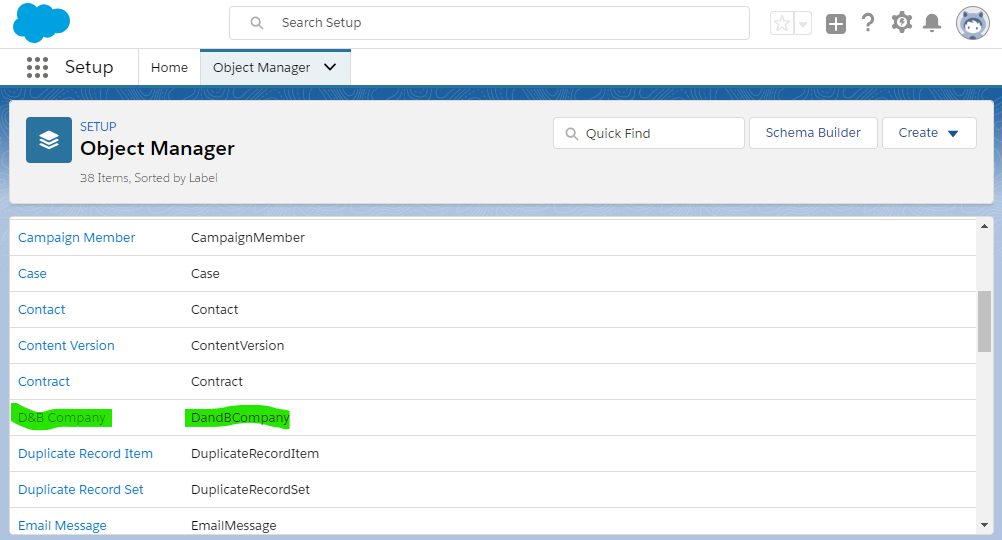
If we are developing and we know the API name, it would make sense to use the term 'dandb' as the Quick Find search input. Well, this is what we get when we do that:
Note that no results are returned...
Now, this is what you get when your search term is 'D&B', which is part of the Object Label:
The same thing happens with the field names, when you search by substrings of the API name, no results are returned if the Field Label doesn't contain that substring...
Another example of field search in the same object, D&B Company:
If we are programmatically manipulating this field on this object and we know its API name is SalesTurnoverGrowthRate, but we don't know some of its details, for example, its length, then it makes sense to go to the Object Manager and look for that field to check the information we are after. This is what we get if we search by 'Turnover':
Note that no results are returned... That substring is part of the API name, but is not part of the Label, and therefore it doesn't show in the result list.
However, if you search by 'revenue', which is a substring of the Label, but not contained in the API name, the result is as follows:
Also note that the search is not case sensitive, as the search term used is 'revenue', all lower case, and the Label contains the substring 'Revenue', with a capital R.
Success Idea
There's already a Success Idea for this: this link. I've upvoted it as I think this is an important feature that Lightning Experience is missing, not only to search by API name, but also by Description... So if you also think this is an important feature, please follow the link and upvote for this idea.
Looking for a field that you know the name of is great to get information about its properties, but when you don't have much information about it, it becomes quite difficult if you can only search by the field label...
A blog about Cloud Implementations on the Salesforce platform, Data Integration and general development.
Showing posts with label Salesforce Learning. Show all posts
Friday, 16 November 2018
Wednesday, 5 October 2016
Being a Salesforce Developer in the Community
There are times in your life when you pause for a few seconds and think to yourself: 'How did I end up here?'
I do that quite often; while I'm commuting to and from work or while travelling from here to there on the plane... Those moments that only belong to you, when only you can hear your thoughts... I do my own retrospectives, having an insight to what my life is and how I got to be the person I am and doing what I do.
And I'm talking about this because the content of my thoughts at those moments is actually my career path, and how I ended up being a Salesforce developer.
My previous development experience had mainly been with Java, working for a big consultancy firm on the financial services sector, and then working for a small consultancy on big civil engineering projects. That's when I heard about this other small company called Desynit with a few Java projects, but with a special focus on a different technology called Salesforce. And from that moment, my life as a developer started changing, giving me skills I hadn't had the chance to develop before.
What's the Salesforce learning curve?
This is one of the questions I'm asked more frequently, and the answer to it is simple: if you're a developer with an object oriented background, then it's really quick. My experience, coming from a Java background, is that you can easily learn Apex with minimal effort.
The rest (Visualforce, Lightning, ...) depends on your front-end skills before starting with Salesforce, but I always recommend everyone to take a look at Trailhead, where they can learn all things Salesforce, from user to admin to development; hundreds of guided tutorials that you can try yourself with the free Salesforce Developer ORGs.
My experience in the Community
The Salesforce community is a huge online space where you find answers to your questions, and also very funny pictures of people having fun in their DUGs (Salesforce Developer User Groups). From Twitter to Salesforce Stack Exchange you have lots of resources and people willing to help.
And that's what I've done myself. I surf the net looking for answers to my problems, I ask my questions to my fellow developers on Twitter, where the Salesforce community is huge.
But one of the things that's helped me the most was running my local Salesforce Developer User Group in Sevilla. Meeting people in your local area who work on your same industry is a key factor to motivate yourself. Since then, I've been able to show Salesforce to people who didn't know anything about Salesforce, and also discuss more advanced topics with other Salesforce professionals.
Since then I've given a few presentations and overcome one of my biggest fears in the past, public speaking. Having attended a few Salesforce events over the world, it was something I really wanted to be able to do. I started giving a few presentations as part of our DUG meetings, and managed to do a couple more with a bigger audience at Madrid Essentials.
And now I'm looking forward to the next one!
These are just a few things that make me appreciate to be part of the Salesforce community. It's been a long time since I've complained about work, so that must be a sign that some things are working well...
But if there's one thing that I can say is always true and constant in the Salesforce world, that is definitely LEARNING. There's always something new to learn. LEARN! LEARN! LEARN!
So keep your eyes peeled!
I do that quite often; while I'm commuting to and from work or while travelling from here to there on the plane... Those moments that only belong to you, when only you can hear your thoughts... I do my own retrospectives, having an insight to what my life is and how I got to be the person I am and doing what I do.
And I'm talking about this because the content of my thoughts at those moments is actually my career path, and how I ended up being a Salesforce developer.
My previous development experience had mainly been with Java, working for a big consultancy firm on the financial services sector, and then working for a small consultancy on big civil engineering projects. That's when I heard about this other small company called Desynit with a few Java projects, but with a special focus on a different technology called Salesforce. And from that moment, my life as a developer started changing, giving me skills I hadn't had the chance to develop before.
What's the Salesforce learning curve?
This is one of the questions I'm asked more frequently, and the answer to it is simple: if you're a developer with an object oriented background, then it's really quick. My experience, coming from a Java background, is that you can easily learn Apex with minimal effort.
The rest (Visualforce, Lightning, ...) depends on your front-end skills before starting with Salesforce, but I always recommend everyone to take a look at Trailhead, where they can learn all things Salesforce, from user to admin to development; hundreds of guided tutorials that you can try yourself with the free Salesforce Developer ORGs.
My experience in the Community
The Salesforce community is a huge online space where you find answers to your questions, and also very funny pictures of people having fun in their DUGs (Salesforce Developer User Groups). From Twitter to Salesforce Stack Exchange you have lots of resources and people willing to help.
And that's what I've done myself. I surf the net looking for answers to my problems, I ask my questions to my fellow developers on Twitter, where the Salesforce community is huge.
But one of the things that's helped me the most was running my local Salesforce Developer User Group in Sevilla. Meeting people in your local area who work on your same industry is a key factor to motivate yourself. Since then, I've been able to show Salesforce to people who didn't know anything about Salesforce, and also discuss more advanced topics with other Salesforce professionals.
Since then I've given a few presentations and overcome one of my biggest fears in the past, public speaking. Having attended a few Salesforce events over the world, it was something I really wanted to be able to do. I started giving a few presentations as part of our DUG meetings, and managed to do a couple more with a bigger audience at Madrid Essentials.
And now I'm looking forward to the next one!
These are just a few things that make me appreciate to be part of the Salesforce community. It's been a long time since I've complained about work, so that must be a sign that some things are working well...
But if there's one thing that I can say is always true and constant in the Salesforce world, that is definitely LEARNING. There's always something new to learn. LEARN! LEARN! LEARN!
So keep your eyes peeled!
Monday, 29 February 2016
New Trailheads: the Salesforce Nautical Chart!
We've been joking about pirates lately. The Salesforce community has been talking a lot about it and we've been showing our sense of humour. See related tweets...
And just about the same time, Salesforce has released some new Trailhead content. It's like a Nautical Chart to guide your Salesforce navigation.
And this has just come out on time for our next DUG in Sevilla, we'll be doing some Trailhead sessions, and some of the attendees are beginners who have never worked with Salesforce, so perfect timing for the arrival of this new Trailhead. The key to a successful sailing!
Navigate the Salesforce Advantage
This new Trailhead will help us learn about the key differentiators that drive Salesforce's success: core values, innovative technology and vibrant ecosystem.
These are the 4 modules that make this new Trail:
Salesforce Success Model
Learn about who Salesforce is and the Four Core Differentiators (10 minutes)
Link here.
Salesforce Cloud Benefits
Understand the success that a complete CRM brings to your business and how it can help you evolve as your business needs change (10 minutes)
Link here.
Salesforce Technology Basics
Get to know the underlying technology principles of Salesforce; trusted Cloud, Multitenancy, Metadata and Development and Customisation of the platform (40 minutes)
Link here.
Salesforce Ecosystem
An insight to the Salesforce community, the available resources, events, and so forth... (20 minutes)
Link here.
And just about the same time, Salesforce has released some new Trailhead content. It's like a Nautical Chart to guide your Salesforce navigation.
And this has just come out on time for our next DUG in Sevilla, we'll be doing some Trailhead sessions, and some of the attendees are beginners who have never worked with Salesforce, so perfect timing for the arrival of this new Trailhead. The key to a successful sailing!
Navigate the Salesforce Advantage
This new Trailhead will help us learn about the key differentiators that drive Salesforce's success: core values, innovative technology and vibrant ecosystem.
These are the 4 modules that make this new Trail:
Salesforce Success Model
Learn about who Salesforce is and the Four Core Differentiators (10 minutes)
Link here.
Salesforce Cloud Benefits
Understand the success that a complete CRM brings to your business and how it can help you evolve as your business needs change (10 minutes)
Link here.
Salesforce Technology Basics
Get to know the underlying technology principles of Salesforce; trusted Cloud, Multitenancy, Metadata and Development and Customisation of the platform (40 minutes)
Link here.
Salesforce Ecosystem
An insight to the Salesforce community, the available resources, events, and so forth... (20 minutes)
Link here.
Monday, 21 December 2015
Build an application on Salesforce App Cloud from start to finish
December 2015...
The force has just awakened...
And the Trailhead Team have created an incredible new project that helps you wake up in the force too... you can build your first application on Salesforce App Cloud from start to finish.
Build a Battle Station App
This links to the new Trailhead project
The purpose of this project is to guide you through the process of building an application on Salesforce App Cloud from start to finish.
You will not be required to write any code; so don't panic if you're new to App Cloud, because the purpose of this Trailhead project is to introduce you to the basics of app building.
You need a free Developer Edition ORG to complete this project. If you don't have one, you can create a new one here.
This new app you are going to build is a project management app that allows users to manage the resources and supplies used to build a Battle Station.
You will learn point-and-click skills that are applicable to building almost anything on App Cloud. Here's what you'll be doing:
- Create the app and a data model for the application. This simple application requires only a few custom objects with a small number of fields.
- Modify the user interface on the browser and on Salesforce1 Mobile using page layouts, compact layouts, and global actions
- Implement business logic using formulas, validation rules and a process builder
- Build reports and dashboards to track the status of supplies and analyze how well the company manages resources.
Go get your hands on this new Trailhead project and complete it by the 31st of December for a chance to win some amazing prizes:
- 3 PlayStation 4 Consoles
- 10 Sphero Robots
- 15 Air Hogs Remote Control Quad Copters
More new content
If you're not new to Salesforce there are good news for you too! There is some new Trailhead content for you to look at and earn some new badges!
Admin Advanced Trail
Reach all star admin status by tackling more advanced Salesforce features.
Link here.
Apex Integration Services Module
Integrate with external apps using Apex REST and SOAP services.
Link here.
Advanced Formulas Module
Learn how to write clean, easy-to-understand formulas for complex use cases.
Link here.
Lightning Chatter Basics Module
Get started with enterprise social collaboration in the new Lightning Experience.
Link here.
Lightning Data Management Module
Learn how to import and export data in the new Lightning Experience.
Link here.
Application Lifecycle Management (rewritten)
Learn best practices for team app development and lifecycle management.
Link here.
The force has just awakened...
And the Trailhead Team have created an incredible new project that helps you wake up in the force too... you can build your first application on Salesforce App Cloud from start to finish.
Build a Battle Station App
This links to the new Trailhead project
The purpose of this project is to guide you through the process of building an application on Salesforce App Cloud from start to finish.
You will not be required to write any code; so don't panic if you're new to App Cloud, because the purpose of this Trailhead project is to introduce you to the basics of app building.
You need a free Developer Edition ORG to complete this project. If you don't have one, you can create a new one here.
This new app you are going to build is a project management app that allows users to manage the resources and supplies used to build a Battle Station.
You will learn point-and-click skills that are applicable to building almost anything on App Cloud. Here's what you'll be doing:
- Create the app and a data model for the application. This simple application requires only a few custom objects with a small number of fields.
- Modify the user interface on the browser and on Salesforce1 Mobile using page layouts, compact layouts, and global actions
- Implement business logic using formulas, validation rules and a process builder
- Build reports and dashboards to track the status of supplies and analyze how well the company manages resources.
Go get your hands on this new Trailhead project and complete it by the 31st of December for a chance to win some amazing prizes:
- 3 PlayStation 4 Consoles
- 10 Sphero Robots
- 15 Air Hogs Remote Control Quad Copters
More new content
If you're not new to Salesforce there are good news for you too! There is some new Trailhead content for you to look at and earn some new badges!
Admin Advanced Trail
Reach all star admin status by tackling more advanced Salesforce features.
Link here.
Apex Integration Services Module
Integrate with external apps using Apex REST and SOAP services.
Link here.
Advanced Formulas Module
Learn how to write clean, easy-to-understand formulas for complex use cases.
Link here.
Lightning Chatter Basics Module
Get started with enterprise social collaboration in the new Lightning Experience.
Link here.
Lightning Data Management Module
Learn how to import and export data in the new Lightning Experience.
Link here.
Application Lifecycle Management (rewritten)
Learn best practices for team app development and lifecycle management.
Link here.
Friday, 4 September 2015
Salesforce Trailhead: Learning Lightning Development
We are just 2 weeks away from Dreamforce 2015, I'm going again this year, so I have to get up to speed with the latest features. After last week's announcement to Meet the New Salesforce you can't help but get your hands on learning the new Lightning Experience, and what better way to do it than with Trailhead? None. So that's why I encourage everyone wanting to start building Lightning components to check it out. It's also a really nice way of starting your preparation for what's to come with the new Salesforce release in Winter '16.
The Lightning Experience Developer Trail takes you through 5 modules to show you an overview of the different points of view of the new Salesforce development approach:
I consider it quite important to highlight that the Lightning Experience is not fully terminated and rolled out to the whole platform at the time of writing this post (September 2015), and even if it brings new capabilities that weren't available before, it is still "Work In Progress" and it doesn't support all the features that Salesforce Classic does at the moment.
In Salesforce's own words: "Lightning components are still in their infancy and not all the features you’re used to in Visualforce are fully supported yet."
Just be patient and let the Salesforce team do their job. We'll definitely be getting updates from them with the progress through the usual channels...
This is what you can expect from each of the Modules. As usual, you will earn some new badges and you can win up to 5800 points!
Lightning Experience Basics
Find out about what the Lightning Experience is and how it's different to Salesforce Classic. View examples of the look and feel of the new interface.
Get advice on how to decide whether the new experience is right for you.
Instructions on how to enable it in your ORG.
Lightning Experience Development

An overview of the impact of the new User Experience on the typical Developer tools, like Apex, the API, Visualforce, and others.
Recommendations on what technology you should use depending on the requirements of your application. One of the features from the Lightning Experience I'm more excited about is the fact that you don't have to worry about compatibility accross devices and browsers, it's all taken care of for you!
Guidance on what to do with Packaged applications or the Apps in the AppExchange to accommodate the new Lightning Experience.
Visualforce & Lightning Experience
You will find out the ways in which you can keep using Visualforce within the Lightning Experience.
Set up your work environment for a better development experience: code editor, page viewers and review in multiple environments.
Discover how Visualforce pages behave when running in Lightning Experience and how to share them between both experiences, as well as the styling considerations to bare in mind.
Lightning Components
This module describes what Lightning Components are and how the new Lightning Components framework differs from the Visualforce one. Prepare for a good 4 hours of exciting training with this module, because this is where you will write some actual code and connect your Trailhead to your Developer ORG to create some Lightning Components.
An overview of the different techniques available for Lightning Components is given in this module: server-side and client-side controllers, Apex and JavaScript...
Lightning Design System
This final module goes into the Design principals used in the Lightning Experience. You get introduced to the Block-Element-Modifier syntax (BEM) for styling your components.
Some explanations about the Grid System, that is a good way to understand the layout that your Lightning Components will use.
You will find out next the recommended ways of accessing your Data in Salesforce from your Lightning Components; and also how to include Avatars and Icons within your components.
The final activity of this module helps you build Record Home Page making use of several components!
And now you're all set to understand MOST of what people will be talking about at Dreamforce '15!
It was helpful for me, so I hope this is also of help for you.
The Lightning Experience Developer Trail takes you through 5 modules to show you an overview of the different points of view of the new Salesforce development approach:
- Lightning Experience Basics
- Lightning Experience Development
- Visualforce & Lightning Experience
- Lightning Components
- Lightning Design System
I consider it quite important to highlight that the Lightning Experience is not fully terminated and rolled out to the whole platform at the time of writing this post (September 2015), and even if it brings new capabilities that weren't available before, it is still "Work In Progress" and it doesn't support all the features that Salesforce Classic does at the moment.
In Salesforce's own words: "Lightning components are still in their infancy and not all the features you’re used to in Visualforce are fully supported yet."
Just be patient and let the Salesforce team do their job. We'll definitely be getting updates from them with the progress through the usual channels...
This is what you can expect from each of the Modules. As usual, you will earn some new badges and you can win up to 5800 points!
Lightning Experience BasicsFind out about what the Lightning Experience is and how it's different to Salesforce Classic. View examples of the look and feel of the new interface.
Get advice on how to decide whether the new experience is right for you.
Instructions on how to enable it in your ORG.
Lightning Experience Development

An overview of the impact of the new User Experience on the typical Developer tools, like Apex, the API, Visualforce, and others.
Recommendations on what technology you should use depending on the requirements of your application. One of the features from the Lightning Experience I'm more excited about is the fact that you don't have to worry about compatibility accross devices and browsers, it's all taken care of for you!
Guidance on what to do with Packaged applications or the Apps in the AppExchange to accommodate the new Lightning Experience.
Visualforce & Lightning Experience
You will find out the ways in which you can keep using Visualforce within the Lightning Experience.
Set up your work environment for a better development experience: code editor, page viewers and review in multiple environments.
Discover how Visualforce pages behave when running in Lightning Experience and how to share them between both experiences, as well as the styling considerations to bare in mind.
Lightning Components
This module describes what Lightning Components are and how the new Lightning Components framework differs from the Visualforce one. Prepare for a good 4 hours of exciting training with this module, because this is where you will write some actual code and connect your Trailhead to your Developer ORG to create some Lightning Components.
An overview of the different techniques available for Lightning Components is given in this module: server-side and client-side controllers, Apex and JavaScript...
Lightning Design System
This final module goes into the Design principals used in the Lightning Experience. You get introduced to the Block-Element-Modifier syntax (BEM) for styling your components.
Some explanations about the Grid System, that is a good way to understand the layout that your Lightning Components will use.
You will find out next the recommended ways of accessing your Data in Salesforce from your Lightning Components; and also how to include Avatars and Icons within your components.
The final activity of this module helps you build Record Home Page making use of several components!
And now you're all set to understand MOST of what people will be talking about at Dreamforce '15!
It was helpful for me, so I hope this is also of help for you.
Thursday, 6 August 2015
Trailhead by Salesforce: Detective Learning with Event Monitoring!
If you are thinking of learning Salesforce, or you already know Salesforce and want to update your knowledge and get up to speed with the latest features, a very good way to do it is to use Trailhead, an interactive and intuitive learning tool provided by Salesforce to guide you through the process of learning about the Salesforce1 platform while having fun. Your achievements will be rewarded with points and badges.
There are now 30 modules, 7 trails and 6 projects available in Trailhead, aimed at both admins and developers, so you can choose the one that best suits your needs.
The latest Trailhead releases are the following:
- Admin Trail - CRM, with three modules
- Dreamforce Trail with Get Ready for Dreamforce module
- Event Monitoring
Out of the new content, today I will be focusing on the Event Monitoring module. I have recently been carrying on some investigations in one of the Salesforce orgs that I usually work on to find out who did something really dodgy on a trigger, and I find it fascinating all the things you can find out when you dig in a bit deeper, so doing the Trailhead module on Event Monitoring would help me become a better Salesforce Detective.
It takes about 45 minutes to finish the whole module, broken down into 15 minute blocks that you can follow as you find gaps through your day, or whenever you need a break from whatever you are doing. These are the three blocks for the Event Monitoring module, each of them can give you up to 100 points, a total of 300!
Get Started with Event Monitoring: This is an introduction to Event Monitoring, explaining what you can achieve with it and defining a few basic concepts. The way this block is structured makes you want to keep reading and it definitely catches your attention.
Query Event Log Files: This section drives you through one of the most useful tools in Salesforce, the Workbench, which allows you to inspect the Event Log Files in a very intuitive way.
Download and Visualize Event Log Files: This last block gives you details about how to download the Event Log Files and the format in which the files are generated, so that it becomes easy for the end user to read and understand the file's content.
So once you complete your module, you'll get your points and new modules are suggested to you. I encourage you to take on the different modules, even if you already know Salesforce, as it gives you other points of view and approaches you wouldn't have thought yourself...
I wish I could have used Trailhead when I first started learning Salesforce, it makes it a lot easier to learn, more in line with the online world we live in.
And if you are not sure how to get started with Trailhead, you can alwasy check for Salesforce User Groups in your area; you will always find someone there to ask for help or even organise a joint Trailhead session.
Thanks very much for reading this post, I hope you found it useful and enjoyed getting started with Trailhead.
There are now 30 modules, 7 trails and 6 projects available in Trailhead, aimed at both admins and developers, so you can choose the one that best suits your needs.The latest Trailhead releases are the following:
- Admin Trail - CRM, with three modules
- Dreamforce Trail with Get Ready for Dreamforce module
- Event Monitoring
Out of the new content, today I will be focusing on the Event Monitoring module. I have recently been carrying on some investigations in one of the Salesforce orgs that I usually work on to find out who did something really dodgy on a trigger, and I find it fascinating all the things you can find out when you dig in a bit deeper, so doing the Trailhead module on Event Monitoring would help me become a better Salesforce Detective.
It takes about 45 minutes to finish the whole module, broken down into 15 minute blocks that you can follow as you find gaps through your day, or whenever you need a break from whatever you are doing. These are the three blocks for the Event Monitoring module, each of them can give you up to 100 points, a total of 300!
Get Started with Event Monitoring: This is an introduction to Event Monitoring, explaining what you can achieve with it and defining a few basic concepts. The way this block is structured makes you want to keep reading and it definitely catches your attention.
Query Event Log Files: This section drives you through one of the most useful tools in Salesforce, the Workbench, which allows you to inspect the Event Log Files in a very intuitive way.
| Trailhead shows your module progress as you play along |
Download and Visualize Event Log Files: This last block gives you details about how to download the Event Log Files and the format in which the files are generated, so that it becomes easy for the end user to read and understand the file's content.
So once you complete your module, you'll get your points and new modules are suggested to you. I encourage you to take on the different modules, even if you already know Salesforce, as it gives you other points of view and approaches you wouldn't have thought yourself...
I wish I could have used Trailhead when I first started learning Salesforce, it makes it a lot easier to learn, more in line with the online world we live in.
And if you are not sure how to get started with Trailhead, you can alwasy check for Salesforce User Groups in your area; you will always find someone there to ask for help or even organise a joint Trailhead session.
Thanks very much for reading this post, I hope you found it useful and enjoyed getting started with Trailhead.
Subscribe to:
Posts (Atom)